


Common Room, at its core, is a data unification hub (the name is self-suggestive) and is used by marketers for ABM. The tool’s AI-powered lead-level engagement tracking on communities and socials, and Agentic AI for GTM set it apart from other ABM tools.
In this article, I’ll walk you through all Common Room features, reviews, and help you decide if Common Room is the one for your ABM strategies.
Here we go!
Let’s have a look at how Common Room address data aggregation and enrichment:
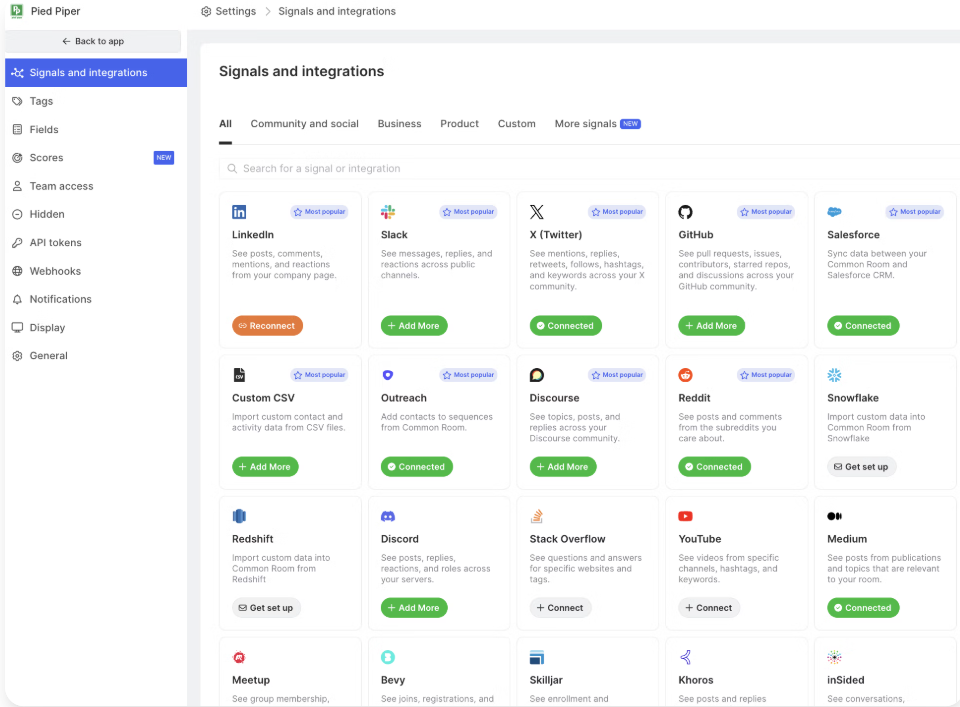
Common Room, being an excellent data unification hub, extracts buying signals and enrichment data from 50+ native integrations.
These integrations span:
And all these connections are no-code native ones!
Once data is in Common Room, it is merged and enriched into unified contact and account profiles. The AI-powered Person360™ identity engine automatically matches records from different sources (email, social profile, product usage, etc.) to dedupe contacts and assign them to the correct account:
It goes beyond simple email matching, using “dozens of providers” and AI logic to link contacts by multiple unique identifiers. For accuracy, uncertain merges are flagged for manual review.

Common Room runs a waterfall enrichment once the contact or lead has been verified and merged with an account.
It automatically pulls firmographic/technographic attributes (company size, industry, revenue, tech stack, job postings, etc.) from hundreds of data partners (the data is refreshed daily).
We saw how Common Room uses waterfall enrichment to enrich the account and lead information.
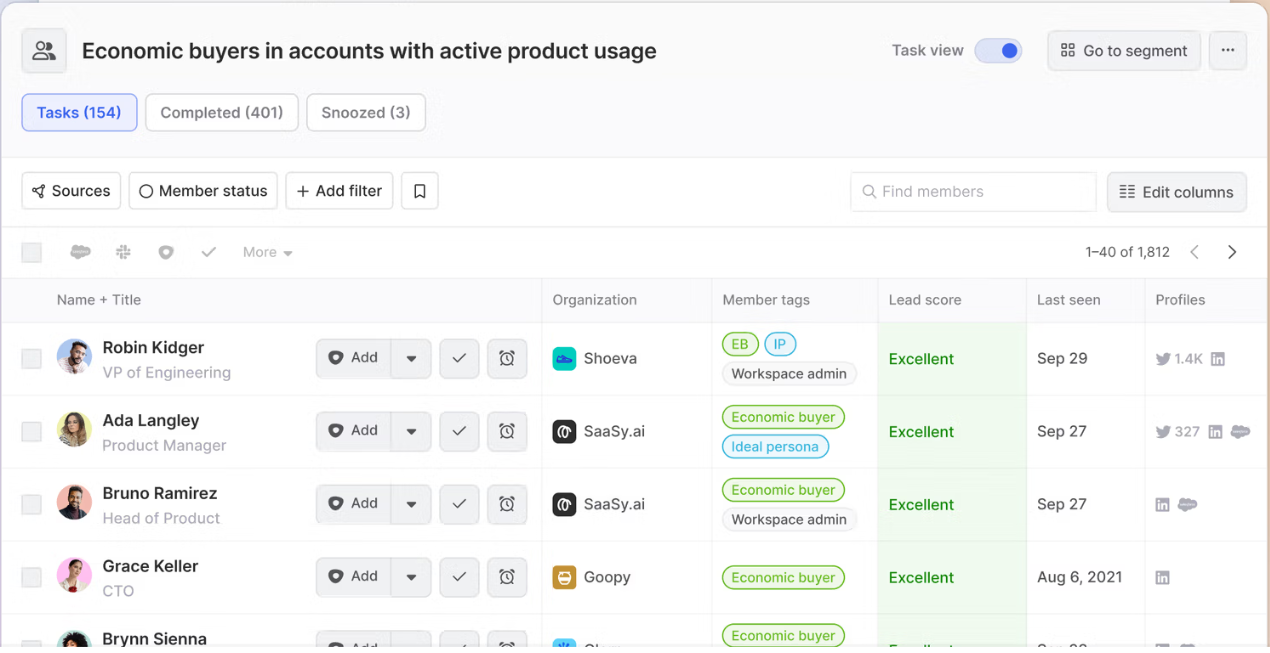
Now, over this raw data, Common Room’s AI (called RoomieAI™) puts scorecards and filters to quantify fit and intent. Users can define lead-scoring models that combine arbitrary signals (e.g. number of job changes, product usage metrics, keyword searches, etc.) with firmographic or technographic filters. Common Room supports hundreds of “buying signals” (email opens, form fills, G2 interactions, open-source contributions, etc.) that feed its scoring engine. For example, one can create tags or segments for “ideal persona” or “economic buyers” by filtering on usage thresholds and seniority titles.
The platform then applies lead scores at both the contact and account levels, and the configuration is pretty customizable:
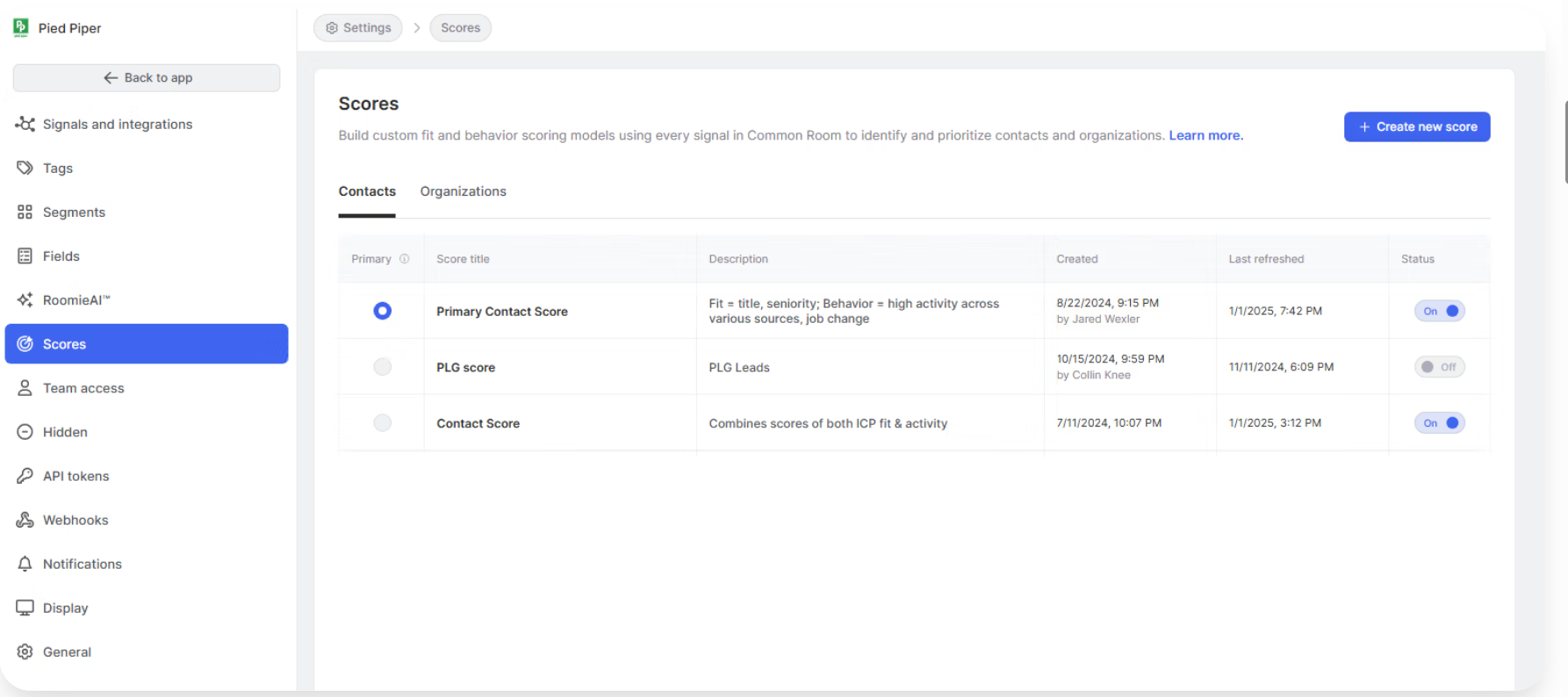
This segmentation and scoring help sales and marketing teams get prioritised lists of contacts with high combined fit-and-intent scores. Also, alerts can be set up when a lead in a segment crosses a threshold score.
Notion’s team, for instance, uses Common Room filters to tag high-value accounts (e.g. “high-fit orgs”) and configures alerts (e.g. Slack notifications) whenever a target account shows buying behaviour.

Common Room has its own contacts database (200M+ contacts) enriched with all sorts of firmographic and technographic data.
You can provide the tool with your preferred filters based on your ICP and it will provide a list of accounts from its database and even score them based on its own and third-party data enrichment.
Once you integrate your site, CRM, communities, etc., the scoring will even account for first-party signals for even better prioritisation.
Common Room’s website tracking script captures visitor activity using a first-party cookie (thus immune to the third-party cookie phase out) and IP-based resolution. The script drops a long-lived cookie on each visitor.
Here, just the company is deanonymized; lead-level reveal requires voluntary user input, like a form fill or sign-up.
But once the lead is identified and matched to an account, their site visits, page views, etc., can be seen:

Beyond anonymous web signals, Common Room heavily ingests community and product engagement data to illuminate the “dark funnel”, and this is one of its special features.
It connects to Slack, Discord, GitHub, StackOverflow, Discourse, and other channels where buyers discuss products.
For example, the Slack integration in Common Room imports messages, threaded replies, and reactions, creating a contact for every user who joins your workspace. This helps in identifying champions, influencers, and VIPs within your Slack community by adding firmographic data, which provides insights into member traits like where they work and their roles.
Additionally, Common Room offers alerts and notifications, allowing you to trigger messages to internal Slack channels when notable events occur. This ensures you and your team stay informed about important activities in your community.
The GitHub integration logs PRs, issues, starred repos and discussions for known contacts.
G2 and Influitive integrations capture intent signals (e.g. review reads, advocate activity) to flag accounts in-market.
And there are many similar integrations.
In practice, this means if someone in a target account asks a question on Slack or contributes to your GitHub project, that activity shows up as a signal linked to that person’s profile. The value is that reps can engage (or alert) on these contextual signals. For instance, an AE could set an alert so that if anyone from a strategic account mentions a competitor on Slack or visits a pricing page, they get pinged immediately.
In short, Common Room turns community/community signals into real-time leads, perfect for developer-marketed or community-driven products.
Common Room is not just a data warehouse; it helps teams act:
For instance, Team Alerts let users configure triggers (e.g. “account X visited the pricing page”) that push notifications via Slack or email in real time:
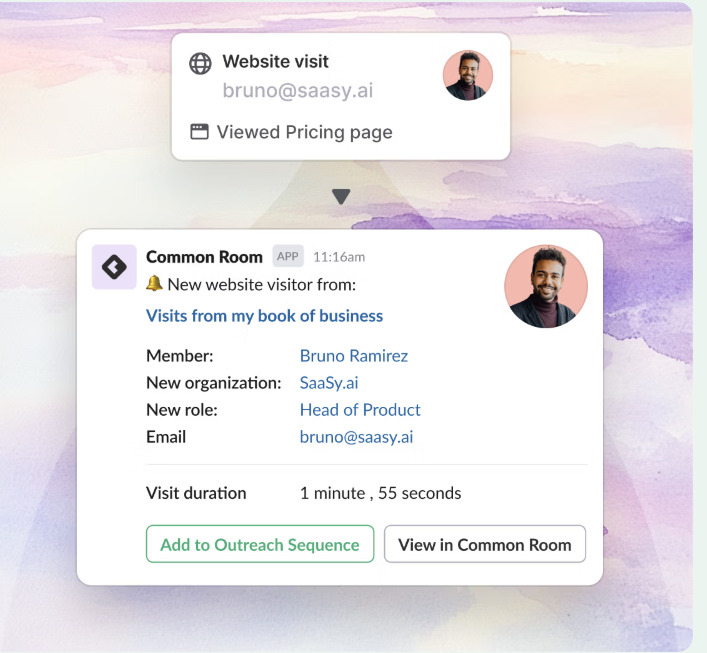
No-code workflows in Common Room enable end-to-end automation:

You can build drag-and-drop rules so that when a new high-fit contact is identified, they’re automatically added to a nurture email sequence or given a task. For example, Notion, using Common Room, automatically tags new trial signups as PQLs and fires them into an outbound playbook, all done automatically.

RoomieAI™ Activate can auto-generate personalised outreach emails based on the prospect’s signals (job change, tech usage, etc.) to maximise relevance.
When it comes to an ABM tool, I feel it must have some native ad management capability or at least the ability to sync audiences and give company-level reporting of ad performance (e.g. which company clicked on which ad, etc.).
But Common Room being focused on community engagement and contact tracking does not provide ad tracking and ROI reporting.
We talked about a lot of integrations in Common Room and their use cases, but they are all around the place.
So here’s a compilation of all integrations offered by Common Room:
| Category | Integration Name(s) |
|---|---|
| CRM & Customer Success | HubSpot CRM, Salesforce CRM, Okta |
| Sales & Marketing (ABM/SDR) | 6sense, Apollo, Outreach, Salesloft, Groove, Demandbase, Marketo, TechTarget, Toplyne, Koala, Qualified, Scarf |
| Product Data & Analytics | BigQuery, Snowflake, Redshift, AWS S3, Hightouch, Census |
| Community & Forums | Slack, Discord, Discourse, DEV (dev.to), Khoros, Influitive, InSided, Bevy, Meetup, Stack Overflow, Gradual |
| Social Media & Public Platforms | LinkedIn, Twitter, Medium, Reddit, YouTube, G2 |
| Code Repositories | GitHub |
| Commerce & Learning | Shopify, Skilljar |
| Customer Engagement | Intercom |
For more details, you can visit Common Room’s Docs.
Let’s look at the pros and cons of Common Room as reported by users on G2:
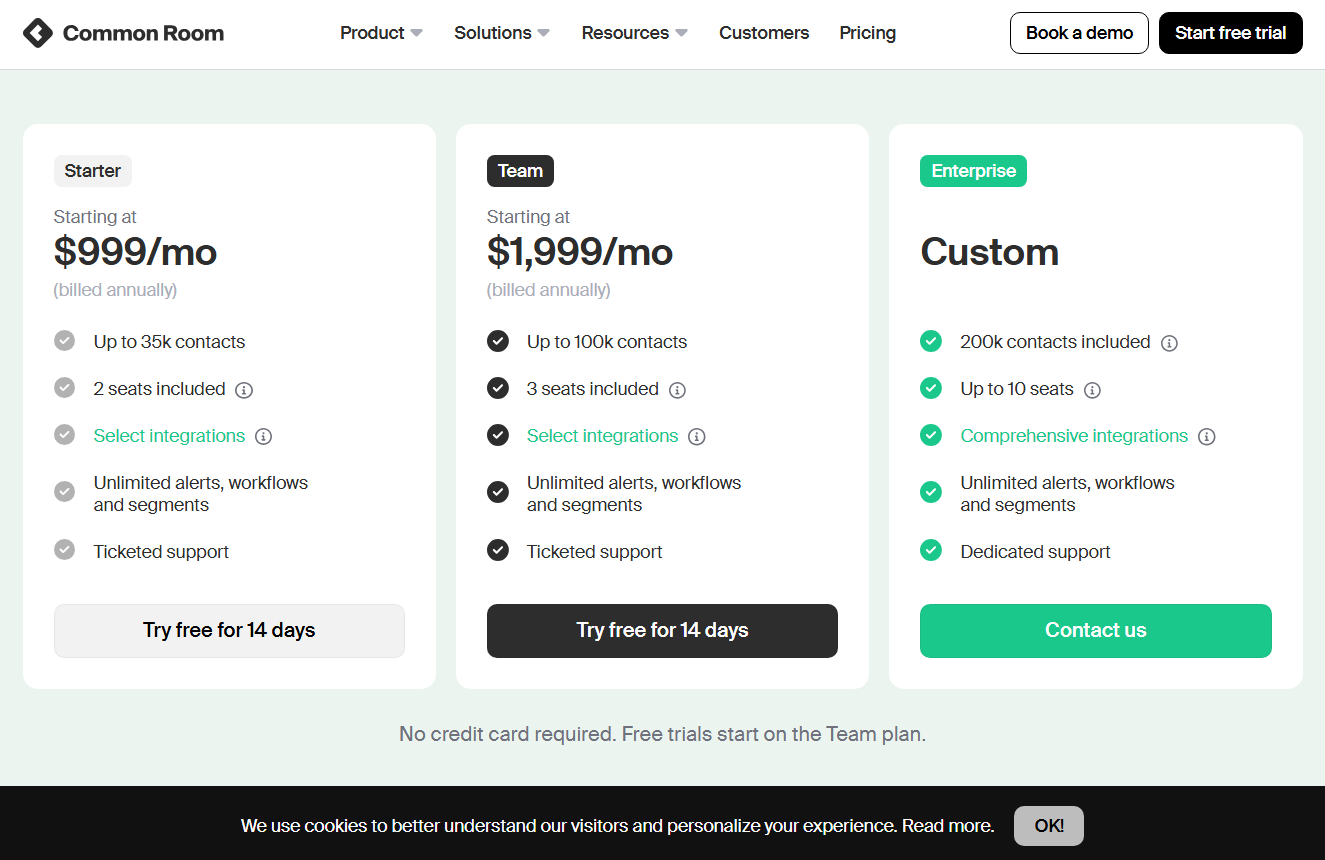
Common Room is a premium B2B product; pricing scales with contact volume and user seats. The entry-level Starter plan (about $1,000/mo billed annually) includes ~35,000 tracked contacts and 2 user seats, plus basic integrations and unlimited alerts/workflows.
The mid-tier Team plan (around $2,500/mo) raises limits to ~100,000 contacts and 5 seats. Both tiers include most core features (visitor tracking, Person360 enrichment, workflow automation, etc.).
An Enterprise plan (custom pricing) accommodates ~200K+ contacts, 10+ seats, and adds all advanced integrations (e.g. full Salesforce data sync, custom objects) and dedicated support.
In reality, teams spend on the order of tens of thousands of dollars per year. Key cost drivers are the number of unique contacts/organizations tracked, number of user licenses, and any special integrations or SLA requirements. Since Common Room charges by data volume rather than number of signals used, clients often trim contact scope to control costs (e.g. only top-tier accounts).
A free trial is available on the Team tier (no credit card).
Common Room is ideal for:
Common Room might be too much if:
Common Room might be insufficient) if:
If your primary platform for running ABM is LinkedIn, ZenABM might be the most affordable (starts at $59) yet complete alternative for Terminus.
It is purpose-built for LinkedIn ads ABM and has these features:
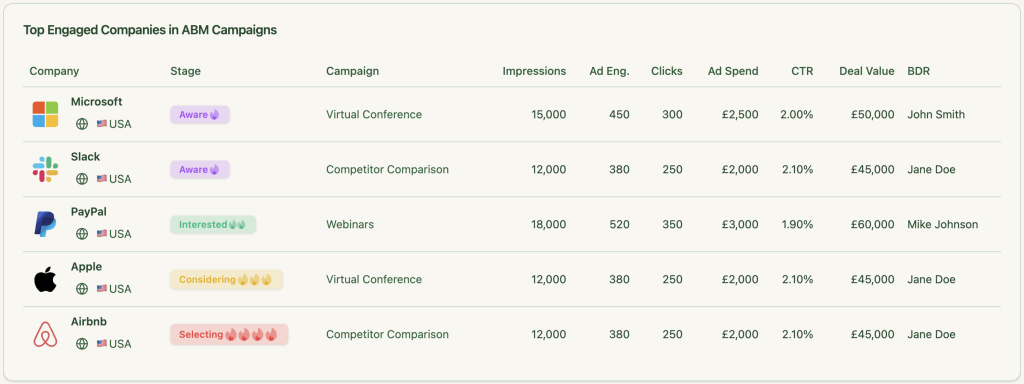
ZenABM uses LinkedIn’s official API (no bots, no cookies) to provide Accurate, reliable company-level ad engagement tracking.
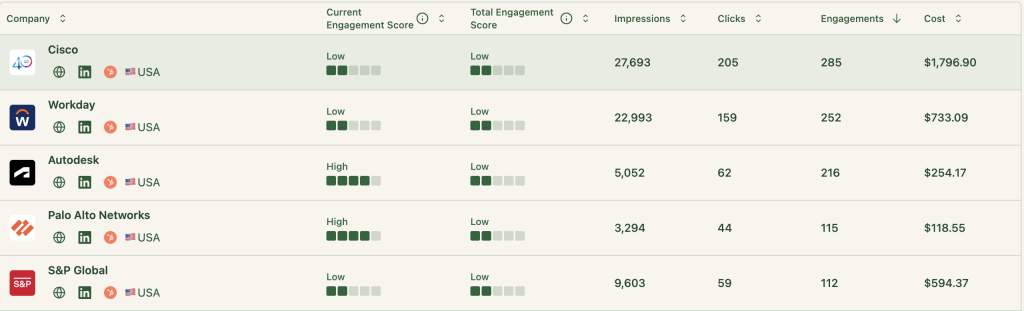
ZenABM scores companies based on recent LinkedIn interactions and highlights hottest leads.
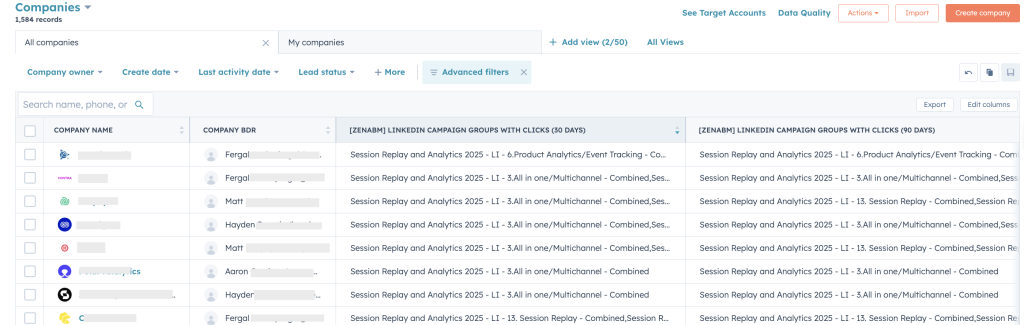
The platform auto-assigns engaged accounts to BDRs and pushes assignments instantly to HubSpot.


ZenABM syncs qualitative (engagement) and quantitative (clicks, impressions) data within HubSpot properties.
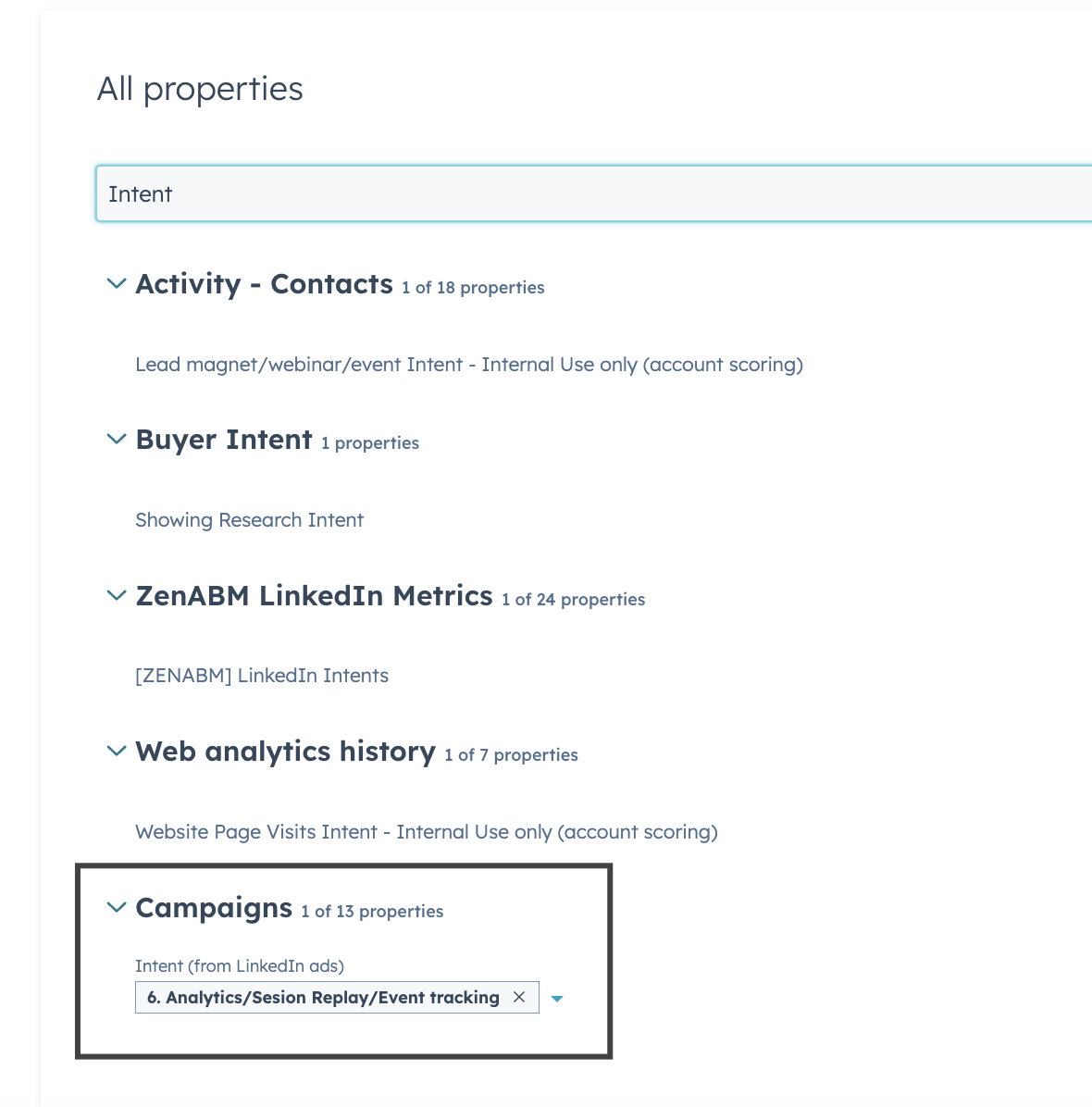
The tool labels campaigns by user intent and provides precise intent data to HubSpot for highly personalized outreach.
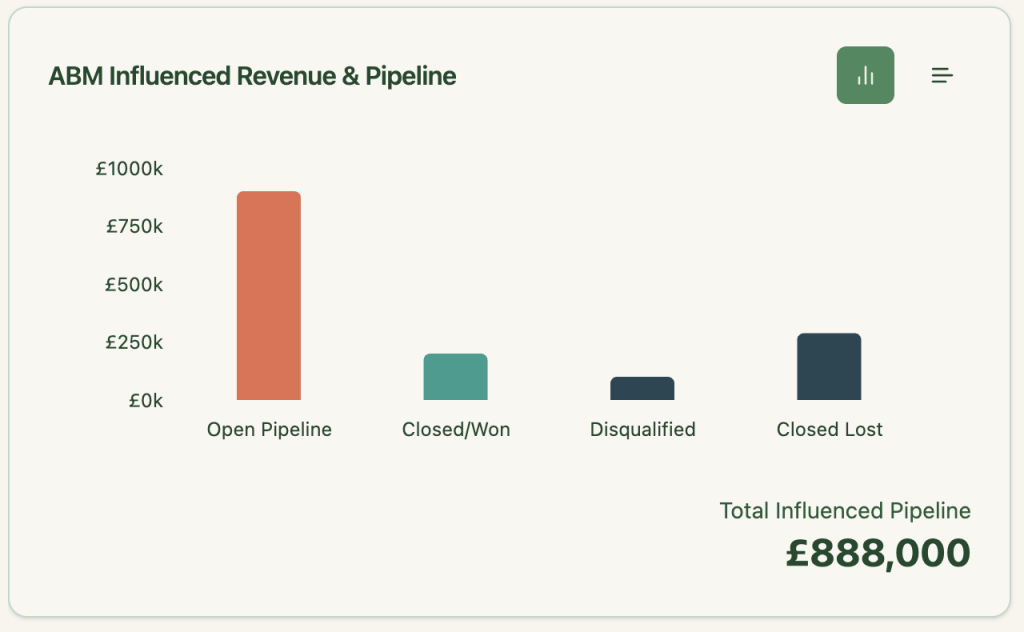
The tool directly links LinkedIn ads to CRM pipeline and revenue metrics and easily track campaign ROI without manual calculations.
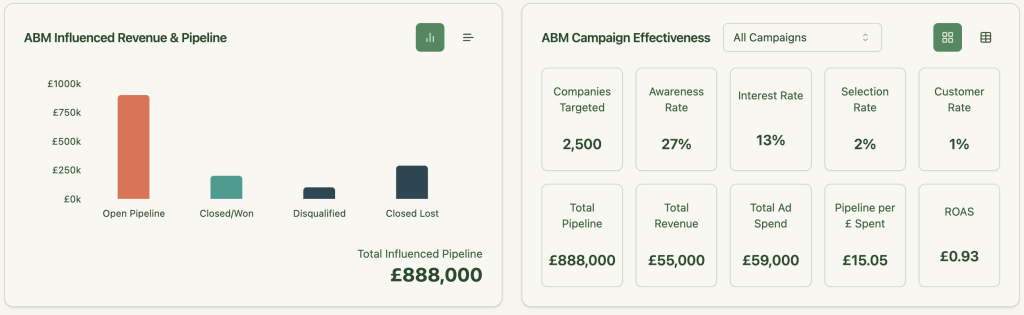
ZenABM provides Instant insights on ROI, pipeline, revenue, and ABM stage analytics in its plug-and-play dashboards.
With ZenABM, you can identify and retarget engaged companies with personalized ads.
ZenABM Pricing
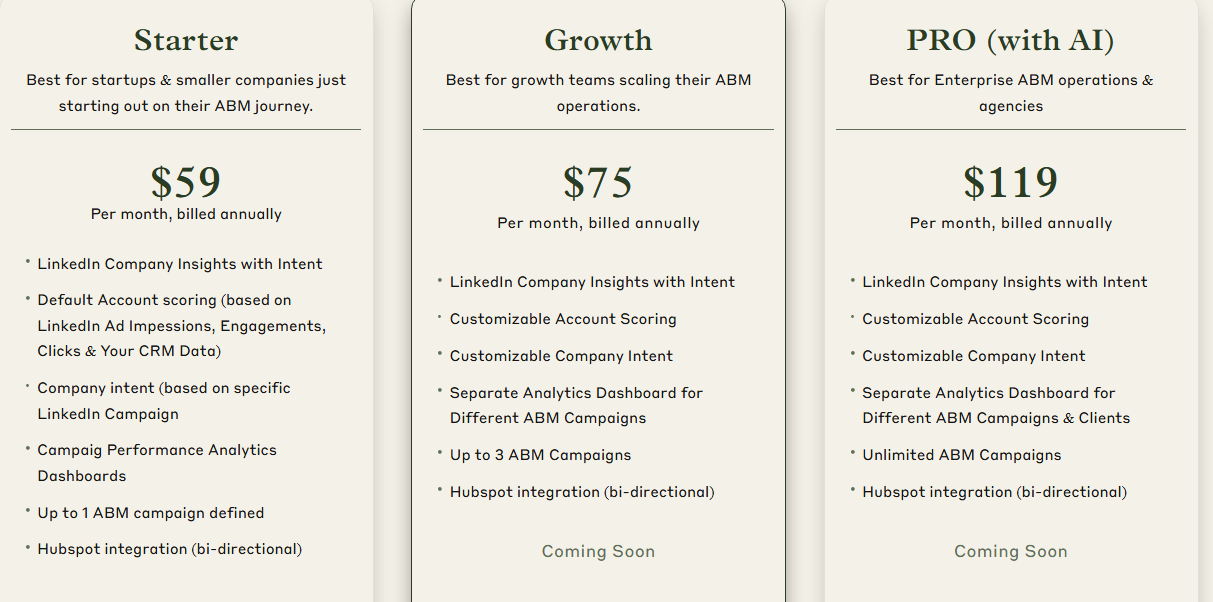
ZenABM offers three straightforward plans designed to grow with your ABM journey.
All plans come with a free trial, and if you need to know more, you can book a demo here.
Very visibly, Zenabm is far more affordable if all you want to run is a LinkedIn ads ABM campaign.
Common Room is a strong choice for teams focused on community-driven or product-led ABM. It excels at unifying signals across social, CRM, and product channels.
However, if you need direct ad tracking, campaign-level attribution, or paid media ROI insights, it may not cover all your needs.
For LinkedIn Ads-focused ABM with full pipeline visibility, ZenABM offers a purpose-built, affordable solution — starting at just $59/month.
Explore ZenABM today!
Common Room is a data unification hub that helps marketing, sales, and success teams track and act on engagement signals across communities, socials, websites, CRMs, and product usage, mainly for ABM and revenue growth strategies.
No. Common Room focuses on organic engagement tracking (community, CRM, web, product signals) and does not natively pull paid ad data (like impressions from LinkedIn Ads, Google Ads, etc.) or offer campaign-level ROI reporting.
B2B companies with strong community-led growth, active developer communities, or product-led growth (PLG) strategies will benefit most. It’s ideal for teams that want to unify buyer signals and prioritize outreach based on organic engagement.
Teams that heavily rely on paid advertising metrics, need company-level ad impression data, or require end-to-end ad attribution and revenue reporting, might find Common Room lacking for their ABM needs.
Yes. If your ABM strategy is heavily LinkedIn-focused and you need company-level ad engagement tracking, intent scoring, and CRM syncing for pipeline attribution, ZenABM offers a purpose-built, affordable solution starting at just $59/month.
